Set up the node
This is the setup common to everything an agent can do — serve the on-chain compute network, sell per-call with x402, or both. At the end you pick your rail.
What you'll need
- Node.js ≥ 18 and Docker ≥ 20.10 (
docker psshould work) - ~10 minutes
- No funds yet — funding depends on the rail you pick at the end
1. Install
git clone https://github.com/hpp-io/noosphere-agent-js.git
cd noosphere-agent-js
npm install
2. Generate your config (interactive)
npm run generate:config              # HPP Sepolia (testnet) by default
# npm run generate:config -- --network mainnet
The generator connects to the community registry and walks you through it. A typical session:
🌐 Network: testnet (chainId: 181228)
📡 Fetching registry from https://raw.githubusercontent.com/hpp-io/noosphere-registry/main/networks/181228.json

📦 Available Containers:

  [1] noosphere-hello-world
      Simple Hello World example container for testing Noosphere compute requests
      Port: 8081, Image: ghcr.io/hpp-io/example-hello-world-noosphere:latest

  [2] noosphere-llm
      LLM (Large Language Model) inference container supporting multiple models via LLM Router and Gemini integration
      Port: 8082, Image: ghcr.io/hpp-io/example-llm-noosphere:latest
  ...

Enter container numbers to add (comma-separated, e.g., "1,2") or "all": 1

💰 Sell these containers per-call via x402? (y/N): n

✓ Config generated: ./config.json
  Containers: noosphere-hello-world

📝 Next steps:
  1. Update wallet.paymentAddress in config.json (receives x402 payments too)
  2. Set environment variables for container env (if any)
  3. Run: npm run init  (to create keystore)
  4. Run: npm run agent (to start the agent)
Start with noosphere-hello-world — the "is everything wired" container. Add more (or
your own) any time by editing config.json; every block is
explained in the configuration reference. Answering y to the selling
question pre-fills the x402 seller block (it will also ask a per-call price) — harmless either
way, you can change it later.
About "Next steps 1": the generator writes wallet.paymentAddress as the zero address.
Set it to the wallet that should receive your earnings — npm run setup:wallet fills it in
automatically when you create the agent's payment wallet, or
edit it by hand.
cp .env.example .env # then edit: KEYSTORE_PASSWORD=<your password>
3. Create your wallet
init imports a private key into an encrypted keystore — generate a fresh one first
(e.g. with Foundry's cast):
cast wallet new              # prints Address + Private key

PRIVATE_KEY=0x<generated key> KEYSTORE_PASSWORD=<your password> npm run init
🔐 Initializing Noosphere Agent Keystore

Creating keystore at ./.noosphere/keystore.json...
Encrypting EOA keystore...
✓ Keystore initialized: ./.noosphere/keystore.json
  EOA Address: 0xYourAgentAddress…

✅ Keystore initialized successfully!

IMPORTANT:
  1. Backup the keystore file: ./.noosphere/keystore.json
  2. Store the password securely
  3. Never commit the keystore file to git
  4. Fund the wallet address with ETH for gas fees
Two addresses matter:
- Agent address (printed above) — signs on-chain delivery transactions. Needs ETH only for the compute-network rail.
- Receiving address (
chain.wallet.paymentAddressinconfig.json) — where earnings accumulate on either rail. Not set automatically: the generator leaves the zero address untilsetup:wallet(or you) fills it.
4. Run it
npm run agent # agent API on :4000
Healthy startup logs look like (excerpt from a real run):
📦 Payload storage config: default=ipfs, S3=✗, IPFS=✗
✓ Loaded keystore: ./.noosphere/keystore.json
  EOA: 0xYourAgentAddress…
🔌 WebSocket connection attempt 1/3...
✓ Connected via WebSocket (push-based events)
Starting from block 295062
🕐 Starting Scheduler Service...
  Commitment generation interval: 60000ms
✓ Noosphere Agent is running
[INFO] Express server running on http://localhost:4000
In a second terminal, start the dashboard:
npm run dev # dashboard on http://localhost:3100
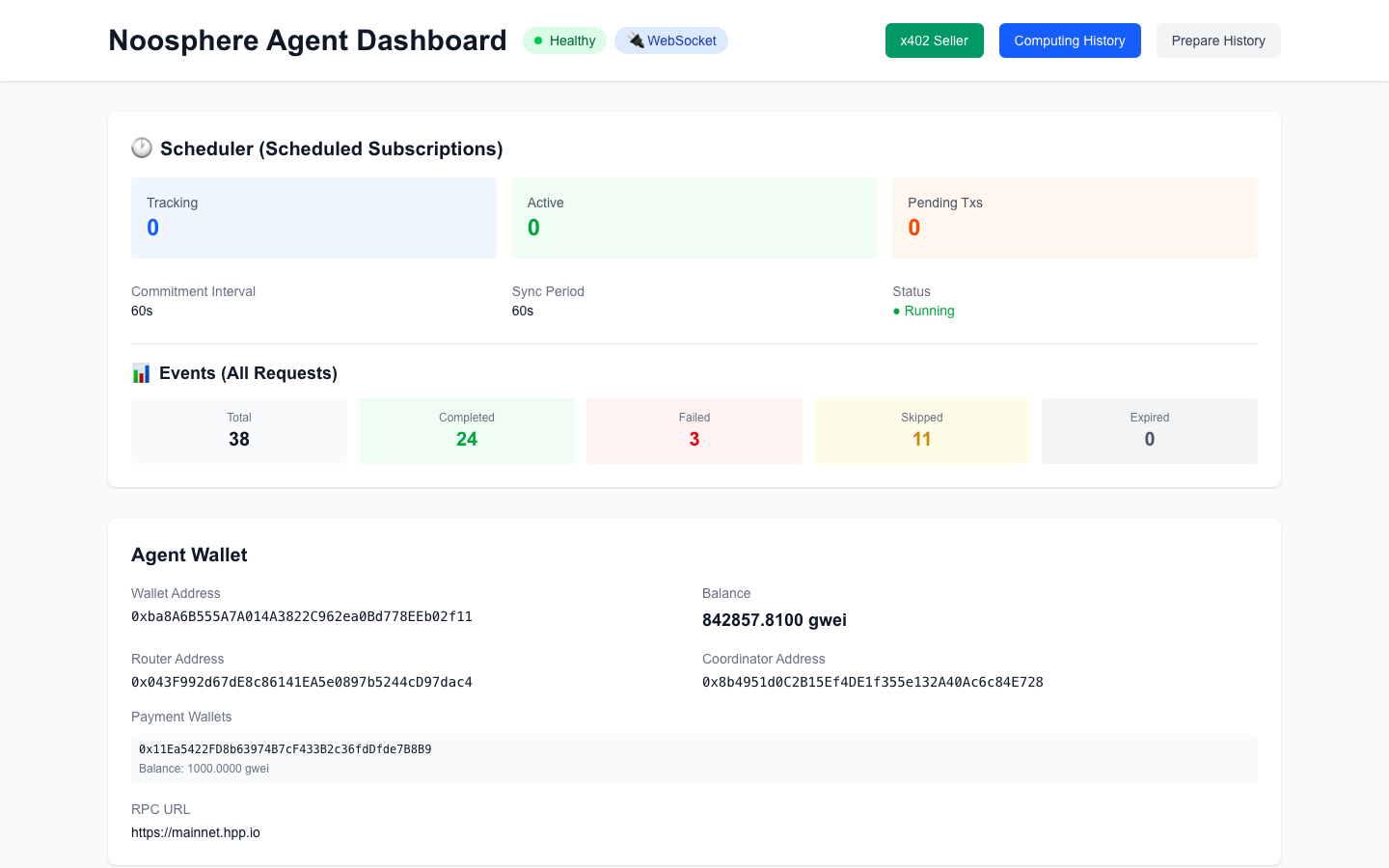
5. Is it healthy? (checklist)
| Check | How | Expect |
|---|---|---|
| Node healthy | Dashboard at localhost:3100 | Healthy + WebSocket badges in the header |
| Container up | docker ps | noosphere-noosphere-hello-world running |
| Chain connection | Dashboard → Agent Wallet card | Router/Coordinator addresses + RPC shown |
Docker deployment
Prefer everything in containers? The repo ships a compose setup — the agent manages your model containers through the Docker socket (siblings, started on demand):
npm run docker:build
npm run docker:up          # agent :4000, dashboard :3100
npm run docker:logs
It mounts docker/config.docker.json as the config and your .noosphere/ keystore; secrets
come from .env.
Troubleshooting (setup)
| Symptom | Fix |
|---|---|
| Agent won't start | .env has KEYSTORE_PASSWORD? Docker running? config.json exists? (npm run init itself requires an existing config.json) |
| Port already in use | Something else on 4000/3100 — set EXPRESS_PORT or remap compose ports |
| Dashboard shows no connection | RPC/WS unreachable — check chain.rpcUrl/wsRpcUrl in config.json |
| Container errors | docker logs noosphere-<container-name> |
Choose your rail
Your node is up. Now decide what it earns from — either, or both; they share the containers and don't interfere:
| Rail | Buyers | Funds to start | Next |
|---|---|---|---|
| ⛓ Compute network | Smart contracts (subscriptions, on-chain settlement) | Agent wallet needs ETH (delivery gas) | Serve the compute network |
| 💰 x402 per-call | Apps & AI agents over HTTP/MCP (stablecoin per call) | None — empty wallet works | Sell from an agent (x402 docs) |