Tutorial: hello-world, end to end
One container, both markets. In this tutorial you will, from scratch:
- Run an agent in Docker serving the
hello-worldcontainer - Sell it per-call with x402 — and pay for it yourself as the buyer
- Serve an on-chain compute request — a contract asks, your agent delivers
Everything below — commands, outputs, screenshots — comes from one real run on HPP Sepolia.
:::tip Want a feel before the terminal? The Noosphere Playground runs this same protocol from a browser dApp — on-chain LLM chat and VRF games on HPP Sepolia, no installation. :::
You'll need: Node.js ≥ 18, Docker ≥ 20.10, Foundry
(cast/forge), jq, and one wallet (the "buyer") holding:
- a little HPP Sepolia ETH — free from the HPP Sepolia Faucet (0.01 ETH goes a very long way at HPP gas prices)
- some testnet USDC.e for Part 2 — see Networks & Token → Funding; on Sepolia it's distributed on request via Official Links
The agent itself starts with zero funds.
Part 1 — Run the agent (Docker)
1.1 Install
git clone https://github.com/hpp-io/noosphere-agent-js.git
cd noosphere-agent-js
npm install
1.2 Create the agent's key
The agent signs with a keystore. Generate a fresh key and import it:
cast wallet new              # note the Address + Private key
cp .env.example .env         # set KEYSTORE_PASSWORD=<a password>

PRIVATE_KEY=0x<generated key> KEYSTORE_PASSWORD=<your password> npm run init
🔐 Initializing Noosphere Agent Keystore

Creating keystore at ./.noosphere/keystore.json...
Encrypting EOA keystore...
✓ Keystore initialized: ./.noosphere/keystore.json
  EOA Address: 0x6D4c904369C1ED5B42371D36714532E00Da30F26

✅ Keystore initialized successfully!

IMPORTANT:
  1. Backup the keystore file: ./.noosphere/keystore.json
  2. Store the password securely
  3. Never commit the keystore file to git
  4. Fund the wallet address with ETH for gas fees
That printed address is your agent. It needs ETH only for Part 3 (on-chain deliveries) — Part 2 works with an empty wallet.
1.3 Configure
Docker mounts docker/config.docker.json as the agent's config. Start from the shipped
config.example.json, save it as docker/config.docker.json, and make it look like this
(a minimal Sepolia config — hello-world container + x402 selling on):
{
  "chain": {
    "enabled": true,
    "rpcUrl": "https://sepolia.hpp.io",
    "wsRpcUrl": "wss://sepolia.hpp.io",
    "routerAddress": "0x480a4f7506548773040d47dd7b6372dbf71358d4",
    "coordinatorAddress": "0xeda4a7957e8f5de6cd6bd747c3ccd5e1c295302c",
    "deploymentBlock": 295062,          // start scanning here — use a RECENT block (explorer → latest)
    "processingInterval": 5000,
    "wallet": {
      "keystorePath": "./.noosphere/keystore.json",
      "paymentAddress": "0x6D4c904369C1ED5B42371D36714532E00Da30F26"   // your agent address
    }
  },
  "containers": [
    {
      "id": "0x2fe108c896fbbc20874ff97c7f230c6d06da1e60e731cbedae60125468f8333a",
      "name": "noosphere-hello-world",
      "image": "ghcr.io/hpp-io/example-hello-world-noosphere:latest",
      "port": "8081"                    // the port /computation listens on INSIDE the image
    }
  ],
  "x402Seller": {
    "enabled": true,
    "payTo": "0x6D4c904369C1ED5B42371D36714532E00Da30F26",              // your agent address
    "facilitators": { "eip155:181228": "https://facilitator-sepolia.hpp.io" },
    "defaultAsset": {
      "eip155:181228": {
        "address": "0x401eCb1D350407f13ba348573E5630B83638E30D",
        "extra": { "name": "Bridged USDC", "version": "2" }
      }
    },
    "services": [
      {
        "name": "hello-world",
        "containerId": "0x2fe108c896fbbc20874ff97c7f230c6d06da1e60e731cbedae60125468f8333a",
        "settlement": "direct",
        "network": "eip155:181228",
        "schemes": ["exact"],
        "x402Price": "1000",            // $0.001 per call
        "inputSchema": { "type": "object" },
        "receipt": true,
        "description": "Hello-world compute, my first paid service"
      }
    ]
  }
}
The container id comes from the community registry — it's
the on-chain identity subscriptions reference. Router/Coordinator addresses:
Registry & deployments.
1.4 Build and start
npm run docker:build
npm run docker:up          # agent :4000, dashboard :3100
npm run docker:logs
Healthy startup (excerpt from the real run):
✓ Loaded keystore: ./.noosphere/keystore.json
  EOA: 0x6D4c904369C1ED5B42371D36714532E00Da30F26
[x402-seller] initialized — 1 service(s) (direct=1, onchain=0), payTo=0x6D4c904369C1ED5B42371D36714532E00Da30F26
[x402-seller] mounted direct routes — POST /paid/compute/hello-world (receipt)
[x402-seller] mcp mounted — /mcp (+/mcp/sse), tools: compute_hello-world
Express server running on http://localhost:4000
WebSocket ready
📊 Total subscriptions in registry: 189
✓ Sync completed - processed all 189 subscriptions
The agent pulled the hello-world image, started it as a sibling container (via the Docker
socket), mounted your paid route + MCP tool, and synced the chain. Open the dashboard at
http://localhost:3100:
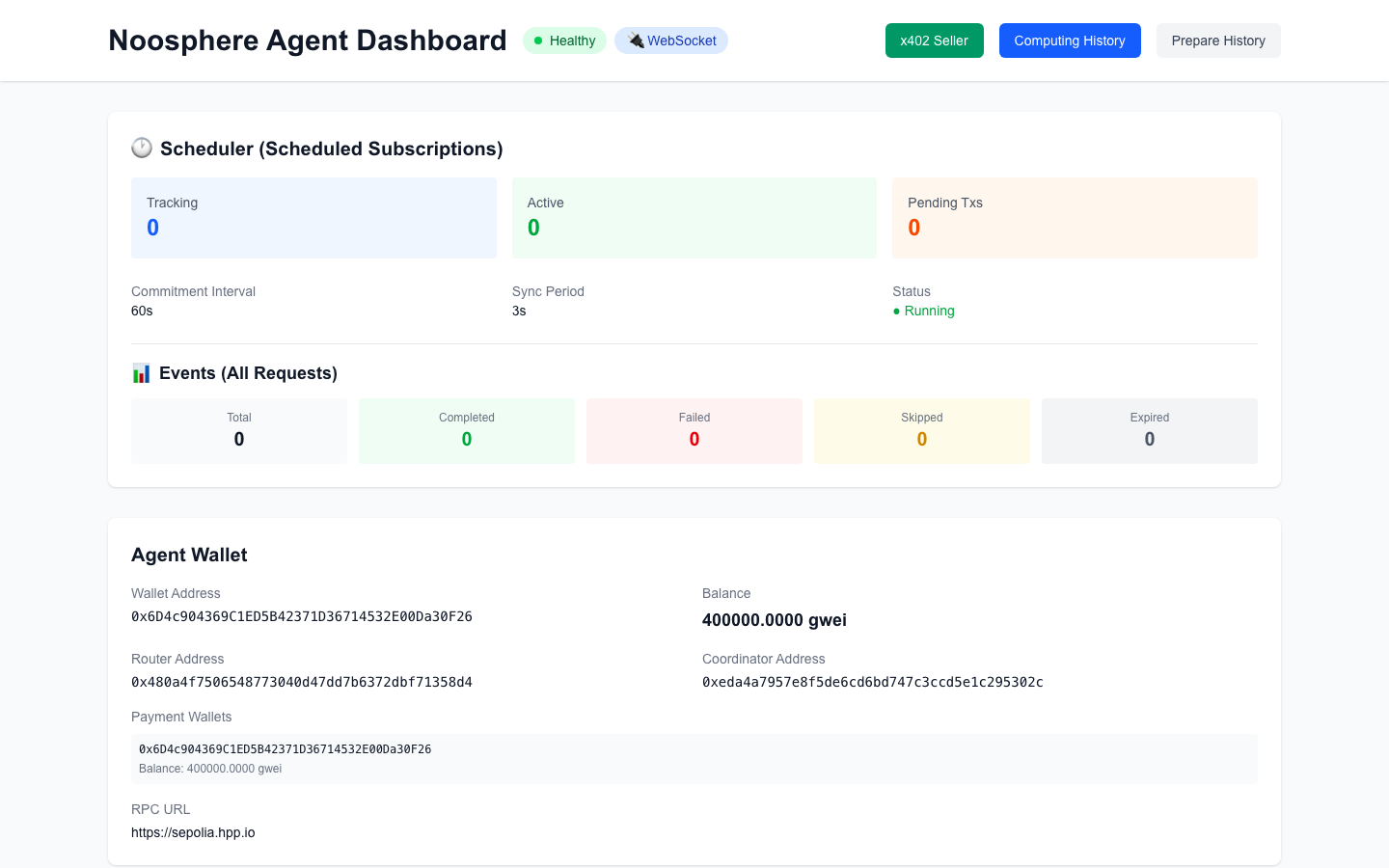
The x402 Seller tab already lists your hello-world service — price, scheme, zero calls —
waiting for its first sale.
Part 2 — Sell it (and buy it) with x402
Your service is already live at POST /paid/compute/hello-world. Now be your own first
customer. The buyer side is standard x402 — wrap fetch with a payment-signing client.
Set up a minimal buyer in a fresh directory:
mkdir hello-buyer && cd hello-buyer
npm init -y
npm install @x402/core @x402/evm @x402/fetch viem tsx
Save the HPP Sepolia client from the
buyer quickstart as buy.ts, change
SCHEME to "exact" (what our service advertises), and append the paid call:
const res = await fetchWithPay("http://localhost:4000/paid/compute/hello-world", {
  method: "POST",
  headers: { "content-type": "application/json" },
  body: JSON.stringify({ input: "hello from the tutorial" }),
});
console.log(JSON.stringify(await res.json(), null, 2));
PRIVATE_KEY=0x<buyer private key> npx tsx buy.ts
The buyer's first request gets 402 + price, signs a USDC.e authorization (no gas), retries —
and gets the result plus a receipt with the on-chain settlement:
{
  "jobId": "…",
  "service": "hello-world",
  "output": "hello world, your input was: hello from 01",
  "receipt": {
    "sellerServiceId": "hello-world",
    "payer": "0x26907E8d732F4abe3E120ef1743352d12738c116",
    "settlement": {
      "network": "eip155:181228",
      "scheme": "exact",
      "transaction": "0x30402029661813c03b94f2a9c3a5dda53d56be0746be8ad8ec3bb34f5ea6e73d",
      "amount": "1000",
      "asset": "0x401eCb1D350407f13ba348573E5630B83638E30D"
    }
  }
}
That transaction is a real on-chain transfer: $0.001 of USDC.e moved from the buyer to
your agent's wallet, gas sponsored by the facilitator. The Seller tab now shows it:
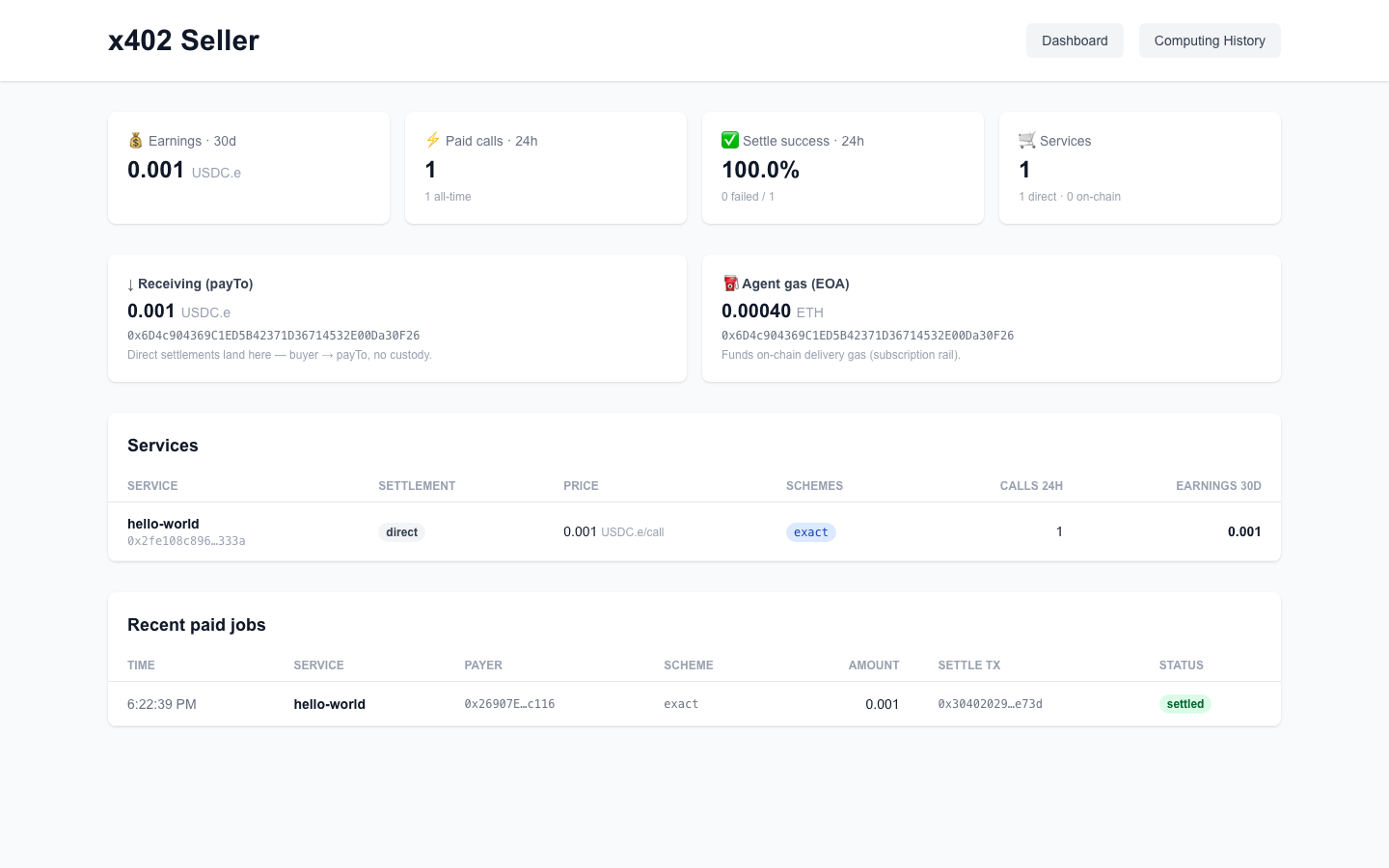
Buyers can also reach the same service as an MCP tool (compute_hello-world at /mcp)
and — once you're on a public URL — discover it on the
x402 Explorer. Full selling guide:
Sell from an agent.
Part 3 — Serve an on-chain request
Now the other market: a smart contract asks for the same compute, and your agent delivers the result on-chain.
3.1 Prepare your agent for deliveries
Two one-time steps the x402 rail didn't need:
# a) delivery gas — send a little Sepolia ETH (from the faucet) to your AGENT address (1.2's output)

# b) the agent's on-chain payment wallet (receives subscription fees —
#    not to be confused with the buyer-side compute wallet of 3.3):
PRIVATE_KEY=0x<agent key> KEYSTORE_PASSWORD=<password> \
WALLET_FACTORY_ADDRESS=0xe1ccab0b5deeca0b240f9bbaeccdbcb252934fa7 \
npm run setup:wallet
✅ Agent wallet setup completed successfully!
  ✓ Agent EOA: 0x6D4c904369C1ED5B42371D36714532E00Da30F26
  ✓ Payment Wallet (CA): 0xd8B16479944FE9015453836C04b8010822bC7906
setup:wallet wrote the new wallet address into config.json
(chain.wallet.paymentAddress). Docker mounts docker/config.docker.json, so mirror that
field there and restart (npm run docker:restart) so the container picks it up.
3.2 Deploy a consumer contract (the buyer side)
The consumer is a contract extending TransientComputeClient — the
noosphere-evm repo ships a sample,
MyTransientClient. Clone it at the deployed protocol version and deploy the sample
pointed at the Sepolia Router:
git clone https://github.com/hpp-io/noosphere-evm.git && cd noosphere-evm
git checkout 80bce17f1c679142c161197a5ddd612e70864f6e   # the protocol version live on-chain
git submodule update --init --recursive

BUYER_KEY=0x<the buyer wallet's private key>
BUYER_ADDRESS=<the buyer wallet's address>

forge create src/v1_0_0/sample/MyTransientClient.sol:MyTransientClient \
  --rpc-url https://sepolia.hpp.io --private-key $BUYER_KEY --broadcast \
  --constructor-args 0x480a4f7506548773040d47dd7b6372dbf71358d4 $BUYER_ADDRESS
Deployed to: 0x2F2800CD931D2d4A6e9CFB4Fbdc17cdaB3aD26ff
:::caution Match the deployed protocol version
The repo's newest main targets the next protocol version — its createSubscription
takes a redundancy parameter the live contracts don't have, so a main-compiled client
reverts with no data. The 80bce17 checkout above matches what is actually deployed.
:::
3.3 Create a compute wallet, approve, subscribe, request
Four transactions — the whole consumer-side ceremony (real hashes from this run):
RPC=https://sepolia.hpp.io
CLIENT=0x2F2800CD931D2d4A6e9CFB4Fbdc17cdaB3aD26ff    # your deploy from 3.2
FACTORY=0xe1ccab0b5deeca0b240f9bbaeccdbcb252934fa7
ROUTE=$(cast format-bytes32-string "Coordinator_v1.0.0")

# 1) a compute wallet to escrow fees (skip if you have one) + fund it a little
TX=$(cast send $FACTORY "createWallet(address)" $BUYER_ADDRESS \
  --private-key $BUYER_KEY --rpc-url $RPC --json | jq -r .transactionHash)
WALLET=0x$(cast receipt $TX --rpc-url $RPC --json \
  | jq -r --arg t $(cast sig-event "WalletCreated(address,address,address)") \
      '.logs[] | select(.topics[0]==$t) | .data' | cut -c27-66)
echo $WALLET     # 0xd8b16479… in this run
cast send $WALLET --value 20000000000000 --private-key $BUYER_KEY --rpc-url $RPC

# 2) let the consumer contract spend from it (native token, unlimited)
cast send $WALLET "approve(address,address,uint256)" $CLIENT \
  0x0000000000000000000000000000000000000000 $(cast max-uint) \
  --private-key $BUYER_KEY --rpc-url $RPC

# 3) subscribe: which container, what fee per delivery, which wallet pays
TX=$(cast send $CLIENT "createSubscription(string,bool,address,uint256,address,address,bytes32)" \
  "noosphere-hello-world" false 0x0000000000000000000000000000000000000000 100 $WALLET \
  0x0000000000000000000000000000000000000000 $ROUTE \
  --private-key $BUYER_KEY --rpc-url $RPC --json | jq -r .transactionHash)
SUB=$(cast to-dec $(cast receipt $TX --rpc-url $RPC --json \
  | jq -r --arg t $(cast sig-event "SubscriptionCreated(uint64)") \
      '.logs[] | select(.topics[0]==$t) | .topics[1]'))
echo $SUB        # 194 in this run

# 4) request compute with your input
cast send $CLIENT "requestCompute(uint64,bytes)" $SUB \
  $(cast from-utf8 '{"input":"hello from the tutorial"}') \
  --private-key $BUYER_KEY --rpc-url $RPC
3.4 Watch your agent deliver
Within seconds, the agent logs (real excerpt):
RequestStarted: 0x…   SubscriptionId: 194
📦 Container: noosphere-hello-world
📥 Inputs received: {"input":"hello from the tutorial"}
✓ Execution completed in 12ms
✓ Result delivered successfully (block 295109)
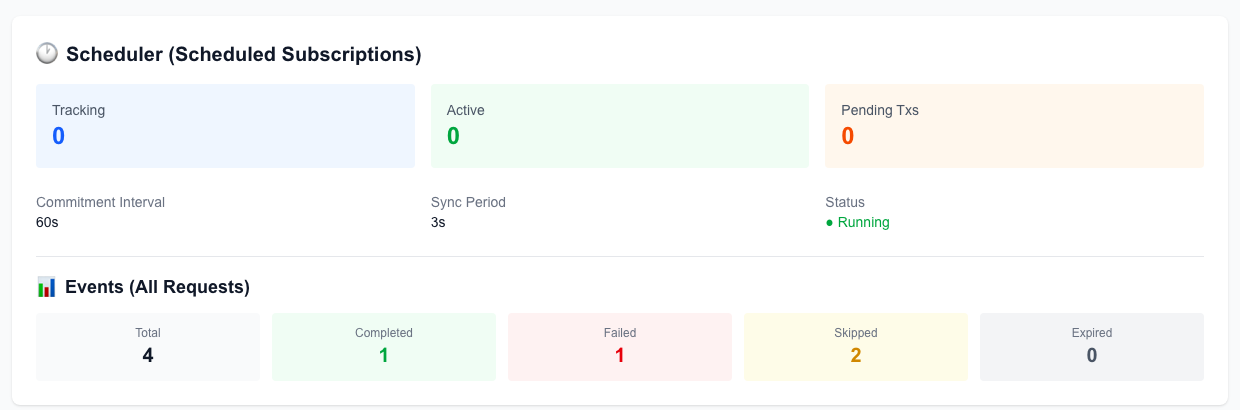
The dashboard's Events card ticks Completed: 1 — your node just earned its first on-chain delivery fee. (The Failed/Skipped counts are leftovers from this capture session's earlier attempts — a clean run shows 1/1. One of them was a lost delivery race, explained in 3.5.)
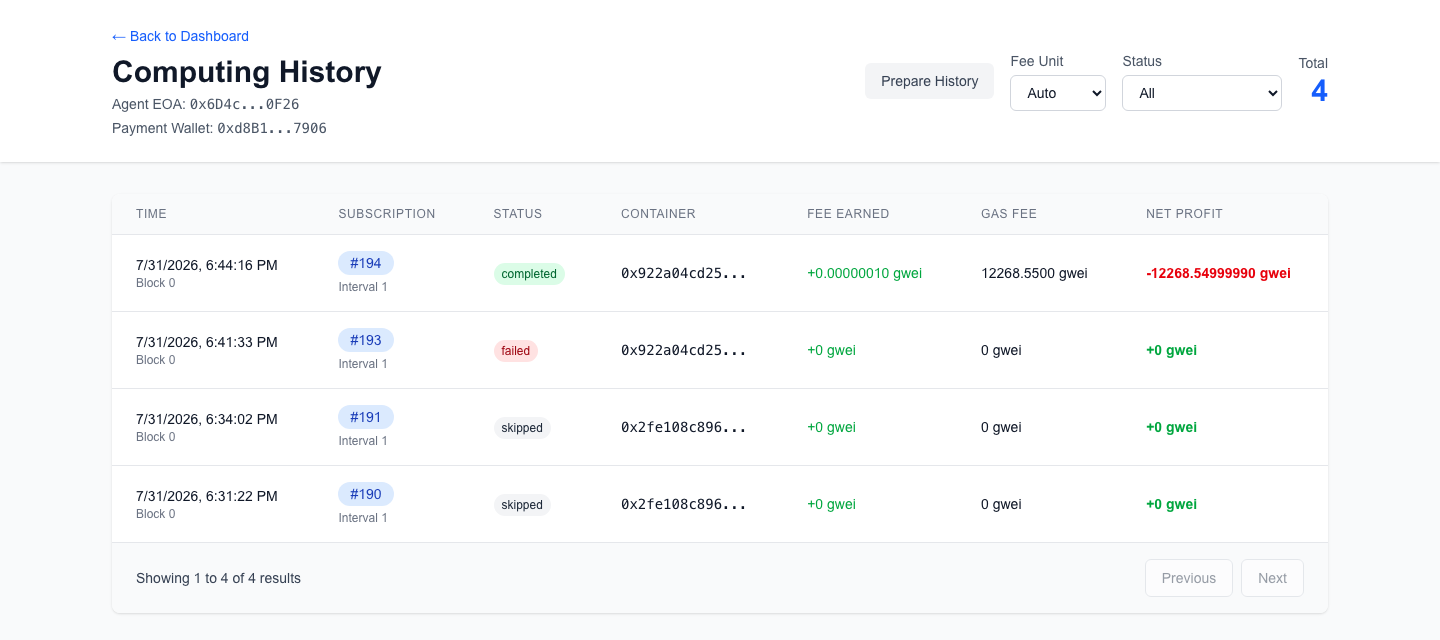
Computing History shows the job with its fee and gas:
3.5 Verify on-chain
The consumer contract received the callback — read the stored result hash straight from the chain:
cast call $CLIENT "lastReceivedOutputHash()(bytes32)" --rpc-url $RPC
# 0x663dedda91f9788a34661eec74b68cfbe1dd20b20826c0bca4008c3de53d0444
On a live network, any agent serving that container may win the delivery — during this run, an unrelated production agent beat ours to an earlier request. That's the marketplace working. To guarantee your agent serves a request (like this tutorial's final run), use a container ID only your node serves.
What you just proved
| x402 rail (Part 2) | On-chain rail (Part 3) | |
|---|---|---|
| Buyer | An HTTP client with a wallet | A smart contract |
| Request path | POST /paid/compute/hello-world | subscription → requestCompute |
| Your agent's job | verify payment → run container → respond | watch chain → run container → deliver tx |
| You got paid | USDC.e per call, instantly, no gas | Subscription fee per delivery |
| Proof | settle tx + signed receipt | delivery tx + on-chain callback |
Next steps: serve your own model · build a real consumer · get listed on the explorer · read the dashboard like an operator